


In response to reader’s comments from my previous post, I have updated the code for this little thingy.
Here are the updates in this version.
1) Added the ability to change pagesize dynamically (I did a separate post on this one earlier)
2) Made the grid rows double clickable. On double click, a window opens up with the selected row which can then be updated.
3) Removed the inline editing as didnt want the confusion of inline editing and double clickable rows.
4) The same “Add Artist” is used for add/update.
5) Changed the CFC to accomodate the update functionality.
6) Fixed a couple bugs and general code optimization and added some more comments in the code.
Any questions, please ask.
Oh, here is the code.
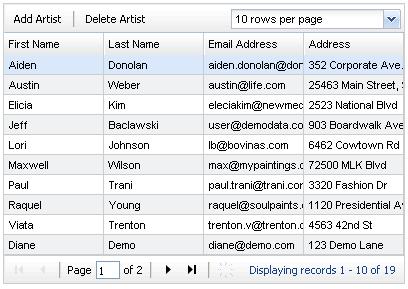
And for those, who want to see how it looks now, before trying, here is a little screen grab.


[…] Anuj Gakhar has updated his CRUD application using ColdFusion 8’s ExtJS-driven CFGRID. There are a number of enhancements based on reader feedback. […]
Hi Anuj, this is a great example, but I can’t seem to get it to work in IE7. I get “‘dataproxy’ is null or not an object” any help is greatly appreciated.
Hi Jason,
Thanks.
Actually, I should have noticed this myself. Its an IE thing as explained here. http://www.coldfusionjedi.com/index.cfm/2008/7/1/IE-issue-with-AjaxProxy
The solution is to change this line
var dataproxy = new dataproxy();
to this
var dataproxy = new cfcproxy();
Because having the same name for the proxy and the variable breaks things, apaprently.
Hope that helps.
Just to make it clear,
you first call the cfajaxproxy tag like this.
<cfajaxproxy cfc=”data” jsclassname=”cfcproxy”> (notice i changed the name to cfcproxy .
And then in your JS
var dataproxy = new cfcproxy();
let me know if it still doesnt work.
Thanks for doing this example! I’ve been trying to figure out how to use grids since I got CF 8.
I’m trying to follow along by using my own data. One of my fields is an integer type. When I try to add a record, I get the following error:
Error invoking CFC /cfusion/schooltest/components/schools.cfc : The YEAR_STARTED argument passed to the addNewSchool function is not of type integer. [Enable debugging by adding ‘cfdebug’ to your URL parameters to see more information]
Is there anything different I need to do in the add window? I have even tried to use the parseInt() function around my variable. Any suggestions?
@Jeff, looks like something you will have to debug. Try debugging and see what values are being passed in to the CFC, or show me your code and I can take a look.
Hi,
I haven’t started yet, but I’m going to use your code but change the drop down box to filter the grid by a specific columns. Any examples or suggestions? BTW I’m loving your blog! WOOHOO!!
@knk, are you saying you want to control which columns you want to hide/show ? If yes, I think there is something already tehre in the Ext library for that. Will have to search a bit.
And, glad that you are liking the blog. 🙂 Thanks for the nice words.
So I have 3 files now that consist of the JS, form and the component. The grid is working and filtering but it’s only filtering the data on that page. It’s not filtering all the data. How can I fix this? Here’s my code:
JS:
function init(){
grid = ColdFusion.Grid.getGridObject(“MemberGrid”);
//var gridFoot = grid.getView().getFooterPanel(true); //make the footer
var gridHead = grid.getView().getHeaderPanel(true); //make the header so I can add button and CB
var tbar = new Ext.Toolbar(gridHead);
cb = new Ext.form.ComboBox({
id:”AccountFilter”,
emptyText:”Filter By Account Status”,
mode:”local”,
triggerAction:”all”,
displayField:”text”,
valueField:”value”,
store:new Ext.data.SimpleStore({
fields: [“value”, “text”],
data: [
[“Active”,”Active”],
[“Inactive”,”Inactive”],
[“Historical”,”Historical”],
[“Guest”,”Guest”],
]
})
});
cb.addListener(“select”,function(combo,record,index){
var AccountStatus = record.data.value;
var AccountStatus2 = record.data.text;
grid.getDataSource().filter(“ACCOUNTSTATUS”,AccountStatus); //fi
});
Ext.fly(tbar.addSpacer().getEl().parentNode).setStyle(‘width’, ‘100%’);
tbar.addButton({
text:”Remove Filter”,
icon:”plugin.png”,
cls:”x-btn-text-icon”,
tooltip:”Remove Filter”,
handler:removeFilter
});
tbar.add(new Ext.Toolbar.Separator());
tbar.add(cb);
console.log(Ext);
}
function removeFilter(){
store = grid.getDataSource()
store.clearFilter();
cb.clearValue(); //clear the value of the combo box
cb.reset(); //reset it so empty text shows up
}
CFFORM:
CFC:
SELECT
m.Id AS id,
m.LastName + ‘, ‘ + m.FirstName AS FullName,
m.CompanyId,
m.EmailAddress,
m.WorkPhone,
c.Name AS CompanyName,
p.Name AS PositionName,
acstat.Name AS AccountStatus,
acstat.id as StatusID,
getdate() as currenttime
FROM
nma_Members AS m INNER JOIN
nma_Companies AS c ON m.CompanyId = c.Id INNER JOIN
nma_AccountStatuses AS acstat ON m.AccountStatusId = acstat.Id INNER JOIN
nma_Positions AS p ON m.PositionId = p.Id
order by #gridsortcolumn# #gridsortdirection#
@knk, you are filtering on whats available and thats just the page you see, so whats happening is right. In order to do a server-side filter, you would have to call the CFC and reload the grid data.
Where should I start? Can you give me some direction please?
instead of this line
grid.getDataSource().filter(”ACCOUNTSTATUS”,AccountStatus); //fi
you would do
grid.reload({AccountStatus});
and make sure the CFc would accept that parameter and run the wuery based on that.
Something like that would work.
Hi,
Another question. I want to add another column to grid that has a hyperlink called Edit. Each row will have a Edit link. I can’t seem to make the href attributes work correctly. I added the column on but it just displays a small line in the column I added? Any Suggestions?
Thanks
@knk, Probably you need a cell renderer.
function renderLink(val, p, record, rowIndex, columnIndex, ds)
{
var html = ‘‘ + val + ‘‘;
return html;
}
and while putting the column
header: “your header”,
dataIndex: ‘dataindex’,
width: 50,
renderer: renderLink
The way I was trying to go is….
cfgridcolumn name=”PASSEDVAL” header=”Update” width=”60″ headeralign=”center” href=”#Request.Config.MidPath#Administration/Members/?action=edit&id=Id” hrefkey=”ID”
I just want to add this link to each row returned to the grid
Edit
The work around that I did was just adding a href to an existing column. One problem that I ran into was passing the CFGRIDKEY in the Url. I was able to fix that by using this
I’m still curious and interested on adding another column and just using text or passing a string to use as a link.
@knk, href and hrefkey should work just fine.
<cfgridcolumn name=”PASSEDVAL” header=”Update” width=”60″ headeralign=”center” href=”#Request.Config.MidPath#Administration/Members/?action=edit” hrefkey=”ID” >
this should correctly make your column a link.
[…] public links >> crud CRUD with cfgrid html format – Part 2 Saved by PlanMaestro on Fri 24-10-2008 Crud…. Saved by amistad on Fri 24-10-2008 Bitter SOA […]
Anuj,
I used your code as the basis for my grid. Some of my data in the columns are links to other pages using the href parameter of the cfgridcolumn. If the data for the row is null, the grid puts a space in the cell and I get a _ (link) in the cell.
I tried to catch the null with a listner put can’t seem to get the right solution. How can I do this?
Thanks, Jim
Here’s my code.
Test Shipping Grid
// create a new JS proxy object for the CFC
var dataproxy = new cfcproxy();
dataproxy.setCallbackHandler(handleResult);
// this function recieves the response from CFC whenever a CFC function is called.
// we are simply alerting the response but we could do more if we had to.
function handleResult(response)
{
alert(response);
}
var myf = function(data,cellmd,record,row,col,store) {
if(data == ” “) return “”;
else return data;
}
// the init()
function init(){
grid = ColdFusion.Grid.getGridObject(“ShipGrid”);
cm = grid.getColumnModel();
cm.setRenderer(9, Ext.util.Format.usMoney);
cm.setRenderer(2,myf);
grid.reconfigure(grid.getDataSource(),cm);
// get the header and fotoer objects
var gridHead = grid.getView().getHeaderPanel(true);
var tbar = new Ext.Toolbar(gridHead);
var gridFoot = grid.getView().getFooterPanel(true);
var ds = grid.getDataSource();
// add the 2 custom buttons to the toolbar
//tbar.addButton({text:”Add Artist”, handler:onAdd });
// tbar.addSeparator();
// tbar.addButton({ text:”Delete Artist”, handler:onDelete });
// add a row double click event for the grid rows.
// the double click will open a popup window for editing the row.
//var sm = grid.getSelectionModel();
//grid.on(‘rowdblclick’,function(grid, rowIndex, record){
// var rec = ds.getAt(rowIndex); // get the clicked row
// populateForm(rec); // populate the form with values
// ColdFusion.Window.show(‘addArtistWin’); // display the window
// });
// this shows the display message by default
var paging = new Ext.PagingToolbar(gridFoot,ds,{
pageSize:10, //number of records displayed in grid
displayInfo:true, // change this to false, if you dont want info displayed
displayMsg:’Displaying records {0} – {1} of {2}’,
emptyMsg:”No records to display”
});
// add a custom combobox to the grid header – this combobox lets you choose the number of rows you want to see
cb = new Ext.form.ComboBox({
id:”pagingCombo”,
emptyText:”Rows per page”,
mode:”local”,
triggerAction:”all”,
displayField:”text”,
valueField:”value”,
store:new Ext.data.SimpleStore({
fields: [“value”, “text”],
data: [
[“5″,”5 rows per page”],
[“10″,”10 rows per page”],
[“15″,”15 rows per page”],
[“20″,”20 rows per page”],
[“30″,”30 rows per page”]
]
})
});
// add event listener to combobox
// this code will update the grid pageSize
cb.addListener(“select”,function(combo,record,index){
// the new pageSize from combobox – it needs to have parseInt() else it starts acting weird
var numRows = parseInt(record.data.value);
paging.pageSize = parseInt(numRows);
paging.onClick(“refresh”);
});
// add the paging combo to right side of the toolbar
Ext.fly(tbar.addSpacer().getEl().parentNode).setStyle(‘width’, ‘100%’);
tbar.add(cb);
}
@Jim, Sorry your comment was stuck in spam and I just noticed. So, is the problem solved or not yet? did you try alerting mycf to see what it was returning?
Yes, I did solve my problem of having a null linked in a cell. You need to do the link with a function, which gives you and opportunity to also intraigate the data and link accordingly. I also found how to control the column alignment with css. Below is my current code.
One last question to answer: If columns are moved, how can I save the grid structure and then restore it on the next visit to the page?
Test Shipping Grid
// create a new JS proxy object for the CFC
var dataproxy = new cfcproxy();
dataproxy.setCallbackHandler(handleResult);
// this function recieves the response from CFC whenever a CFC function is called.
// we are simply alerting the response but we could do more if we had to.
function handleResult(response)
{
alert(response);
}
var myf1 = function(data,cellmd,record,row,col,store) {
if(data > “”) return “” + data + ““;
else return data;
}
var myf2 = function(data,cellmd,record,row,col,store) {
if(data > “”) return “” + data + ““;
else return data;
}
var myf3 = function(data,cellmd,record,row,col,store) {
if (( data != “AUTOMATIC”) && (data > “”)) return “” + data + ““;
else return data;
}
// the init()
function init(){
grid = ColdFusion.Grid.getGridObject(“ShipGrid”);
cm = grid.getColumnModel();
cm.setRenderer(1,myf1);
cm.setRenderer(2,myf2);
cm.setRenderer(3,myf3);
cm.setRenderer(9, Ext.util.Format.usMoney);
grid.reconfigure(grid.getDataSource(),cm);
// get the header and fotoer objects
var gridHead = grid.getView().getHeaderPanel(true);
var tbar = new Ext.Toolbar(gridHead);
var gridFoot = grid.getView().getFooterPanel(true);
var ds = grid.getDataSource();
// this shows the display message by default
var paging = new Ext.PagingToolbar(gridFoot,ds,{
pageSize:10, //number of records displayed in grid
displayInfo:true, // change this to false, if you dont want info displayed
displayMsg:’Displaying records {0} – {1} of {2}’,
emptyMsg:”No records to display”
});
// add a custom combobox to the grid header – this combobox lets you choose the number of rows you want to see
cb = new Ext.form.ComboBox({
id:”pagingCombo”,
emptyText:”Rows per page”,
mode:”local”,
triggerAction:”all”,
displayField:”text”,
valueField:”value”,
store:new Ext.data.SimpleStore({
fields: [“value”, “text”],
data: [
[“5″,”5 rows per page”],
[“10″,”10 rows per page”],
[“15″,”15 rows per page”],
[“20″,”20 rows per page”],
[“30″,”30 rows per page”]
]
})
});
// add event listener to combobox
// this code will update the grid pageSize
cb.addListener(“select”,function(combo,record,index){
// the new pageSize from combobox – it needs to have parseInt() else it starts acting weird
var numRows = parseInt(record.data.value);
paging.pageSize = parseInt(numRows);
paging.onClick(“refresh”);
});
// add the paging combo to right side of the toolbar
Ext.fly(tbar.addSpacer().getEl().parentNode).setStyle(‘width’, ‘100%’);
tbar.add(cb);
}
.x-grid-hd {text-align:center;}
.x-grid-col {text-align:center;}
.x-grid-col-9 {text-align:right;}
Select Column
Sale Order
Ship Number
Invoice Number
Carrier
Waybill Number
Ship Date >
Hi Anuj,
Very clean interface, I love it!
I am working on a similar type of CRUD page using CFGRID, except the functionality I am trying to acheive is as follows:
I have hyperlinks below the grid: Add, Edit and Delete. When the user clicks add, it redirects to an “add user” form. However, for the edit hyperlink, I would like to be able to pass the id of the CFGRID row that the user selects….in other words, the user would first select the row he wants to edit, then click on the “edit user” hyperlink, which would link to “userForm_edit?userID=#userID#”. My problem is that I cannot get that #userID# variable passed…it says that the variable is undefined.
Your help is greatly appreciated.
Thanks, Asheesh
Asheesh,
You would have to get the userid using Javascript.
grid = ColdFusion.Grid.getGridObject(”MemberGrid”);
and then grid.selectedRow.userid (something like that)
more details can be found on the ext website extjs.com ,
I have been following your examples with cfgrid and things have been going well. Thanks for the blogs! But I am unable to see the tooltips on the buttons in the toolbar on the grid. I am using IE6. I do not see them in your examples either. Am I doing something wrong? My code appears like:
tbar.addButton({
text:”Add User”,
cls:”x-btn-text-icon”,
icon:”user_add.png”,
tooltip:”Add New User”,
handler:onAdd
});
Another great example, tank’s Mr. Anuj !!!!
But j’ve a little problem, i’ve make many tests with different browser but after a modify of a record, cfgrid wont refresh..
I’ve try to insert in the page a “killer cache” with cfheader, i’ve try to modify caching method in the browser, i’ve installed last coldfusion patch but cfgrid wont refresh again !!!
Any suggestion ?
Thank’s in advance !!
Gianluca
I am using your code as a base for my table maintenance and am really impressed with how it works. It served as a great example for me to expand my Ajax and CF knowledge. I’ve been successful in adding checkboxes and calendar controls but am having a small problem with drop downs.
When I’m updating a row, in some cases the drop down automatically positions itself to the correct entry for a field, while in others it starts at the beginning of the list. And in each case I appear to be using the same code!!
The case that works is called with this:
And the function is:
SELECT CampName, CampID
FROM CLCamp ORDER by CampID
The one that just goes to the beginning of the list is called with:
The function it calls is:
SELECT TypeName
FROM CLSessionType ORDER by TypeID
I know I must be mising something here, but I can’t figure out why one list goes to the value while the other doesn’t! Can you offer any suggestion?
Thanx a lot.
Not sure why the above post left out all my CFML, but it did.
I finally figured out the reason for the difference in the two cases I tried to describe above and it was caused by the fact that the data going into the drop-down control was not identical to the values in the option list. Apparently when you assign a value to the form drop-down object, it validates it against the items in the option list and if it doesn’t match one of them, the assignment is not made (and there is no error raised).
I had no idea that it would do that kind of validation during an assignment of a value from a variable to a form object.
HI Anuj,
First off great series. I have been using your tutorial and has been workin like a charm. I want to use the addWin as a search screen to filter the data based on the form values entered by the user… is this possible? i tried using a function similar to the saveArtists but i cant seem to get it to work..
would u be able to help me out.. this seems to be hard to find on the web..
Thanks
I have a bindable cfgrid in cf8 that updates just fine (I see the red triangle in the cell). What I need to know is how to refresh the grid after the update so the original cfc that fills the grid runs again to show new updated information. I found these commands but not sure where to put them or how to call them. Should they be in the page or the cfc? ColdFusion.Grid.refresh(‘mygrid’, true) ColdFusion.Grid.getGridObject(‘MyGrid’).render();
KJ, from this link http://livedocs.adobe.com/coldfusion/8/htmldocs/help.html?content=JavaScriptFcns_06.html
The following code snippet comes from an example that lets users delete rows from a grid. When the user selects a grid row and clicks the delete button, the AJAX proxy calls a mycfc.deleteRow function to delete the row from the database. When the function returns successfully, the proxy calls ColdFusion.Grid.refresh to update the grid and remove the row.
<cfajaxproxy bind=”cfc:mycfc.deleteRow({deletebutton@click},{mygrid.id@none}”
onSuccess=”ColdFusion.Grid.refresh(‘mygrid’, true)”>
Hi Anuj,
my grid is bindable so I’m not using a button so do you know another way for me to use this refresh statement.
wouldnt that be the onChange attribute of the cfgrid? you call the cfc’s update() function in the onChange – doesnt that update your grid ?
Yes my grid updates just fine, I see the red triangle to show the update but I need to also refresh the grid because the update affects another column that doesn’t show unless you refresh the grid.
Well, onChange should refresh your grid row. But if it doesnt for whatever reason, the only thing I can think of is call a JS function in your onchange and do the Update CFC call there and then run your Grid.Refresh call.
Thanks I’m using an event listener to handle it.
so you solved it? mind posting the code here for others?
Here is what I did:
function BPCr() {
grid = ColdFusion.Grid.getGridObject(“BPCGrid”);
grid.addListener(“cellclick”,refreshBpc);
// window.alert(“It is refreshing BPC A”);
}
function refreshBpc(grid,rowIndex, columnIndex, e){
//window.alert(“It is refreshing BPC B index ” + columnIndex);
if (columnIndex != 4) {
// window.alert(“It is refreshing BPC B index ” + columnIndex);
ColdFusion.Grid.refresh(‘BPCGrid’, true);
}
}
function BPCr() {
grid = ColdFusion.Grid.getGridObject(“BPCGrid”);
grid.addListener(“cellclick”,refreshBpc);
// window.alert(“It is refreshing BPC A”);
}
function refreshBpc(grid,rowIndex, columnIndex, e){
//window.alert(“It is refreshing BPC B index ” + columnIndex);
if (columnIndex != 4) {
// window.alert(“It is refreshing BPC B index ” + columnIndex);
ColdFusion.Grid.refresh(‘BPCGrid’, true);
}
}
For some reason it is not letting me post the code
I sent an email with the code to info@anujgakhar.com so see if you can post it.
Just approved your previous posts with the code. For some reason, they were marked as spam.
Ok thanks, hope this helps someone.
What do you think about that:
http://forums.adobe.com/message/3247507
?
Have some of the functions stopped working in ColdFusion 9? For example, the adding of custom buttons for “add row” and “delete row” seem to not work now. I know that the underlying JavaScript has changed in the move from 8 to 9.
I’m just testing some new features I’ve written on an application and I’m testing it on my desktop with Win 7 and CF9 but unrelated things are failing. Is this my bug or is there a need to redo some of this for CF9 now?
@john, I have not tried this in CF9 (yet) but if you do happen to fix the code, it would be good if you can post it here. I am currently working on a large Flex project and do not get much time to blog or do side work etc…
I am using your updated code above with modification for my data. I am however, not able to get the data to populate the CFGRID. I receive a exception error thrown line 798 cfajax.js which points to sytaxerror(“parseJSON”). What could I have left out or need to update to get this to work?
Thanks in advance for any and all help!!!
Hello Anuj, with the latest CF upgrade, the cfgrid has stopped displaying the “Displaying records 1-10 of 15” in the footer of the grid. Please suggest how do i work around. Thanks in advance