


I was stuck on this issue few days back, when I happened to have more than 100 errors in my project and Eclipse “Problems” window was only showing me the top 100. It took me a while to figure out where to change this , so I thought I would blog it.
In your Eclipse IDE Preferences (whether its Eclipse, Flex Builder or Adobe ColdFusion Builder), any Eclipse based IDE, you will find this setting under Java->Compiler->Building. Thats where you can change this setting.
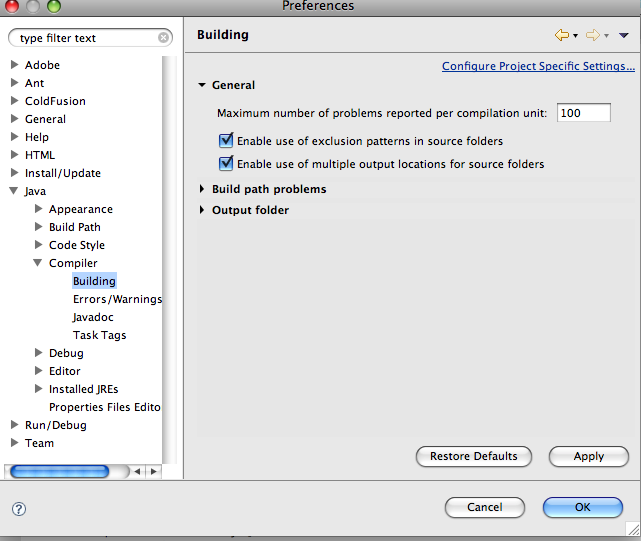
I hope this helps someone.
If you enjoyed this article, please consider sharing it!


You could always aim to write less erroneous code 😛
Thats true John. However, Flex sometimes throws hundreds of errors in your css file even if it finds one wrong embedded link . Thats when situation like these arise 🙂
Hey, thanks for the info. But did you notice there is a ‘MARKER LIMIT’ in View Menu –> Preferences window? This has nothing to do with the compiler but it showed me all the errors only after I unchecked the ‘Use Marker Limits’ checkbox.
Cheers
Ahhh! There! The information I’ve been trying to find! Thanks for sharing this!
Thanks for sharing
Does not work. I increased the number to 10000. Eclipse will show still show:
Errors ( 100 of 3395)
Before:
Errors ( 100 of 629)
Pulsar for Mobile Developers.
Version: Helios Service Release 2
Build id: 20110218-0911
Open problems view.
Click corner triangle.
Select preferences
Uncross:
[ ] Use marker limits
Thanks Joonas! That did the trick.
thanks for your trick………………!
This really helped mate 🙂
In 2013 (e.g., with Eclipse Indigo), this has changed a bit; you still click the down arrow in the Problems view, but then choose “Configure Contents” from the small drop-down menu, and in the lower left of the resulting “Configure Contents” window you will see “Use Item Limits” checkbox and “Number of items visible per group” field. Either turn off the checkbox, or set the limit to something like 500, Then you will be able to see all the errors.
Thanks for the helpful update idarwin! I am sure it will help someone going through the comments here.
thanks breh
Thanks Anuj … your blog just saved me some time.