


Here is an example of how to change the pageSize of an AJAX CFFGRID dynamically.
Purpose :-
Let the end user select how many rows of data he/she wants to see in the Grid. (ie technically speaking, change the pageSize on the fly).
Approach :-
1) Add a ComboBoxwith the number of Rows to be selected, for the user to be able to select. use the Ext JS functions to achieve that.
2) Take the value selected from ComboBox and reload the grid data.
3) Reload the paging Toolbar as well because, apparently, the grid data and paging toolbar work independently, reloading the grid does not reload the paging toolbar. So you have to do that manually.
4) Reconfigure the Grid.
Notes :-
Its worth noting that I also made a change to the CFC that gets the data for the grid. The way it works is, if you set the pageSize to lets say 25, and the query returns only 20 rows, the QueryConvertForGrid would still return 25 rows with 5 blank rows. So just a little check in the CFC fixes this.
[xml]
<cfset var ps = pageSize>
<cfquery name="getArtists" datasource="#this.dsn#">
SELECT *
FROM Artists
<cfif gridsortcolumn neq "" or gridsortdirection neq "">
order by #gridsortcolumn# #gridsortdirection#
</cfif>
</cfquery>
<cfif getArtists.RecordCount LT ps>
<cfset ps = getArtists.RecordCount>
</cfif> >
<cfreturn QueryConvertForGrid(getArtists, page, ps)>
[/xml]
Here is the piece of code that reloads the grid data and updates the paging toolbar.
[javascript]
cb.addListener("select",function(combo,record,index){
// the new pageSize from combobox
var numRows = record.data.value;
// this line forces the grid to reload data with new pageSize
ds.reload({params:{start:0,limit:numRows}});
// the footer paging toolbar still holds old pagesize, so that needs refreshing as well
// Create a new Paging Toolbar
var paging = new Ext.PagingToolbar(gridFoot,ds,{
pageSize:numRows, //number of records displayed in grid
displayInfo:true, // change this to false, if you dont want info displayed
displayMsg:’Displaying records {0} – {1} of {2}’,
emptyMsg:"No records to display"
});
// reconfigure the grid
grid.reconfigure(ds, grid.getColumnModel());
});
[/javascript]
Here is how it looks after all said and done.
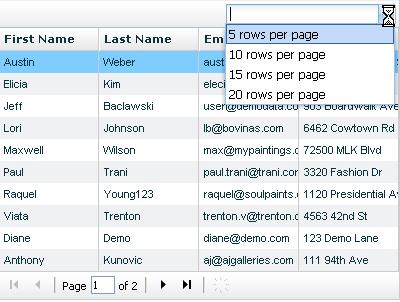
Here is the full source code.


[…] finally, my new most favourite tag: CFGRID. Anuj Gakhar shows how to change the CFGRID pageSize attribute dynamically, and Dan Vega shares a nifty select element trick for editable […]
Very cool. I used it not for creating a dynamic selection, but to help me figure out adding the ‘Displaying records {0} – {1} of {2}’ part of CFGRID. I had a problem, however, if the total recordcount was not an even number.
For example, I had 586 records, and 6 pages of 100. On the last page, it would show ‘Displaying records 501 – 600 of 586’. That seems screwy, so I used your CFC code and added the following:
It worked just fine.
Oops! Here’s the code left out of the previous post (I removed the brackets):
cfset totalPages = ps * page
cfif qRead.RecordCount LT totalPages
cfset ps = qRead.RecordCount – (totalPages – ps)
cfif
@Matt, thanks for your comment. Yes, basically the page number and rowcount parameters are all passed to teh grid from the cfc so have to be controlled via the cfc. The pagingbar itself doesnt do any logic in that context.
Hi,
I tried your example and it will not work for me. I am new to Coldfusion and am using CF8 on a MAC.
The example appears to work until I set the page size to 5 and then use the page next button at the bottom of the grid. It causes the page “1” of total pages not to update correctly so instead of getting page 2 of what ever I get a page 11 for page 2 and a 111 for a page number and so on as I pres the next record button. when I go back one record the grid displays blanks and all kinds of stuff.
If I do not select a page size the grid works fine.
Any ideas as to what I did wrong?
Thanks,
Mike
@Mike,
As far as I remember, I didnt see that happening when I wrote the example. Did you run the exact same code as in the example ?
I downloaded the code into a directory and then ran it. I am using the Coldfusion 8 developers version and am running it as a stand alone server using port 8500.
Could I have a different extJS set of scripts than you do?
Thanks for your help,
Mike
@Mike,
I just downloaded my own example and ran it, and it worked first time. It looks like your mapping to the /cfide/ folder might not be correct ?
I have the same issue as Mike (Page x of y issue). I did alot of debugging and trying different approaches, but no luck. It seems like the pagesize used internally in the grid which can be set to a fixed size cannot be altered after the fact and this value appears to be affecting the values even though the actual rows in the grid change and the footer is initially correct. I change it from 10 to 50. It correctly shows “Page 1 of 3” and “Displaying records 1 – 50 of 109”. Hit the next page button and it says “Page 101 of 3” and “Displaying records 0501 – 05050 of 109”. Like it is almost appending not adding the increment value. I doubt it is a mapping to the CFIDE folder, but assuming it is, how do I change that? I also tried to essentially wipe out the grid and refresh it entirely when the pagesize value changes (using a global variable to save the number, but that fails too, although I may be doing something wrong there. Any help is appreciated.
I found the CFIDE folder in the web root on my local drive and checked the administrator and it is mapped correctly: C:\ColdFusion8\wwwroot\CFIDE . I’m just using the built-in Win XP web server for my computer (no Apache, etc.). I tried with IE 6 and FireFox browsers and they are the same.
Hi Brian/Mike,
Thanks for pointing this out. I spent some time looking into the code and found out the issue actually exists. It was to do with the new pageSize variable which was being treated as a string because I was not doing parseInt on it. So the new line of code looks like this,
var numRows = parseInt(record.data.value);
I have also made some other minor changes to the CFC and the file and the link to the source in the post is now updated. You can download the files again.
Hope that helps!
Works Great. Thanks!
[…] Added the ability to change pagesize dynamically (I did a separate post on this one earlier) 2) Made the grid rows double clickable. On double click, a window opens up […]
Anuj,
I have been using you grid for about a month and I now have about 1000 records in a table that I am using for the grid datasource. when I do a sort on the last name field and then page through the results at 50 records per page, the last page is always wrong. It shows data from page 5 instead of the last page. Any ideas? I can send you the code if you want .
Thanks,
Mike
Mike,
Have you tried using the latest version of the code available from
https://www.anujgakhar.com/2008/08/14/crud-with-cfgrid-html-format-part-2/ ?
If that doesnt work, send me the code and I will take a look.
I had the same problem with both versions as well. Not just a sort, but using the next or last page. It only occurs if you have multiple pages. I just started noticing the problem this past week, but it probably has been there for awhile. Ouch.
I will try the new code. I believe that it happens only when there is not a complete page of data. For example i have on table with 912 records. the page size is 50. all pages display correctly except for the last page. the last 12 records are duplicates of data from the middle of page 5.
Thanks for the help and have a great day!
Mike
Mike, Ben, The only possible problem is in the CFC before your call QueryConvertForGrid() function. You can make your logic to return the correct rows always in the cfc and that should fix it. There is nothing you need to change in the actual grid.
I took out the code and now the grid works however it displays empty rows. No big deal to me. However if a user clicks on an empty row it brings up a record from another page. Any idea’s?
Thanks,
Mike
@Mike, that can only mean a wrong rownumber being passed to the CFC. I can only tell after I look at the code.
We have an interesting issue that some of you may be able to shed some light on. We have a large webservice call (returns over 5000 rows), which we have introduced paging to, so we can request a specific page, which reduced the returned xml to just 15 rows.
This makes the web service request much fast, but now I only see the grid showing “Page 1 of 1”. Obviously I know it doesn’t have all the data anymore to know how many page there are… but if I give it all the data, I dramatically slow it down.
How can I give it 15 rows… but tell it there are actually 5000… and get it to figure out the paging (e.g. display the page number and keep the footer functionality intact).
If anyone has any ideas I would be VERY grateful!
sorry for my spelling on that last post – there’s a few typos! :-s
@Sid, The trick is to have your CFC return the proper recordcount (in your case 5000) and return only 15 rows. The queryConvertForgrid() does exactly this, look at the code in the cfc attached in the post. you will know what I mean.
You are a star my man! A star! 🙂
@Anuj: Really odd… but if I pass a query with 15 records into QueryConvertForGrid(), and a pageSize of 5000, it would just display 15 populates rows and 4985 blank rows.
I can’t alter the record count of the query object itself as it’s readonly. The issue is that I only have 15 of 5000 records at the point I bind the grid, so the actual webservice is already paged before it gets to the grid. I just need the grid to display “Page 1 of 334” (15 records a time) and preserve the pagination functionality.
Does this make sense?
@Sid, Getting blank rows is an expected behaviour from queryConvertforGrid. its known to do that. However, I think that the problem is that you bind a query to the grid which ahs only 15 rows. So there is nothing to page as its only got 15 rows. It would page properly if you bind the query with the full 5000 rows to it and give it a pagesize of 15. Then it would handle the paging on its own. Anything apart from that, would have to be a custom solution I guess.
ok – that makes more sense. The reason I only pass 15 rows of the 5000 is because, getting 5000 rows in a webservice call over the wire is expensive. That was, I thought, the whole idea behind paging (that you only get the data you need).
Thanks for your help though mate 🙂
you are right. you can however write your own code that sends the total recordcount and only 15 rows using JSON….
Do you know how to supress page numbers, and even the footer, entirely?
Nevermind, found it.
grid = ColdFusion.Grid.getGridObject(“grid01”);
var gridFoot = grid.getView().getFooterPanel(true);
var bbar = new Ext.Toolbar(gridFoot);
@Bill, yeah thats right. You need to replace the existing footer with a new footer that doesnt have a pagingbar in it.
Thankyou, thankyou, thankyou for this post!
Anuj, follow-up question: the “rows per page” control is rendering as a combobox but it only works when user selects one of the provided options. How would I allow user to type an integer into the control, press Enter, and have it work as expected?
@John, you are welcome. The only difference is that instead of the combobox , you add a textfield to the bar and use that…should be straightforward.
@sid, I had to do something similar. My solution was to create a struct similar to the one queryconvertforgrid creates:
cfset gridQuery = structNew()
cfset gridQuery.query = yourPagedQuery
cfset gridQuery.totalrowcount = TheTotalRecordCount
Also, to anyone who is having the problem of the last page displaying the wrong data, its because you are passing in the wrong page size to QueryConvertForGrid. Let’s say your first page has 10 records, and your second page has 3 records. On the last page you are padding QueryConvertForGrid the page size of 3. It then thinks that all pages will have three records, so it grabs records 4-7 of the original query (because it thinks that the first page only displayed 3 records).
Hope this helps anyone else who comes across this issue.
@Paul, thanks for that tip, I think I understand now what I am getting the behavior you describe with incorrect data displaying on the last page. The question for me is then, how do you pass the dynamic pagesize back to the grid, if that pagesize is then going to cause data from the middle of your query to be returned? That is, using you example, how do you say that the last page has a size of 3 records, but those records should be the last 3, not the 2nd set of three in the record count? It seems to me that you can’t have it both ways. Any ideas on that? Thanks in advance.
I revisited this again and now it works. The key changes I hade to make was:
1) paging.pageSize = parseInt(numRows);
which I somehow missed previously
2) ColdFusion.Grid.refresh(strGrid, false)
Without the ‘false’ value, changes in the grid could display incorrect paging results.
Although I still get the extra blank rows on the last page for multipage grids. Adjusting pagesize to be returned in the CFC causes errors in what data is displayed because of how pagesize is used on the return. Still would like to see a fix for this.
That eliminate the blanks rows at the last page.
cfset calPageSize = getEmployees.RecordCount / arguments.page
cfif calPageSize LT ps
cfset dif= page * (ps – calPageSize )
cfset ps = Round(ps – dif)
cfif
Remenber the brackets!
The solution is really simple here is the code that keeps the last records at the end.
SELECT *
FROM Artists
order by #gridsortcolumn# #gridsortdirection#
cffunction name=”getArtists” access=”remote” output=”false” returntype=”any”
cfargument name=”page”
cfargument name=”pageSize”
cfargument name=”gridsortcolumn”
cfargument name=”gridsortdirection”
cfset var ps = pageSize
cfset var qGetArtists = “”
cfquery name=”qGetArtists” datasource=”#this.dsn#”
SELECT *
FROM Artists
cfif gridsortcolumn neq “” or gridsortdirection neq “”
order by #gridsortcolumn# #gridsortdirection#
/cfif
cfquery
cfset totalPages = Ceiling(qGetArtists.RecordCount/pageSize)
cfif page EQ totalpages
cfset x = QueryConvertForGrid(qGetArtists,page, ps)
cfset myNewQuery = querynew(“ADDRESS,ARTISTID,CITY,EMAIL,FAX,FIRSTNAME,LASTNAME,PHONE,POSTALCODE,STATE,THEPASSWORD “)
cfloop query=”x.QUERY”
cfif x.QUERY.ARTISTID neq “”
cfset queryaddrow(myNewQuery)
cfset querysetcell(myNewQuery,’ADDRESS’,x.QUERY.ADDRESS)
cfset querysetcell(myNewQuery,’ARTISTID’,x.QUERY.ARTISTID)
cfset querysetcell(myNewQuery,’CITY’,x.QUERY.CITY)
cfset querysetcell(myNewQuery,’EMAIL’,x.QUERY.EMAIL)
cfset querysetcell(myNewQuery,’FAX’,x.QUERY.FAX)
cfset querysetcell(myNewQuery,’FIRSTNAME’,x.QUERY.FIRSTNAME)
cfset querysetcell(myNewQuery,’LASTNAME’,x.QUERY.LASTNAME)
cfset querysetcell(myNewQuery,’PHONE’,x.QUERY.PHONE)
cfset querysetcell(myNewQuery,’POSTALCODE’,x.QUERY.POSTALCODE)
cfset querysetcell(myNewQuery,’STATE’,x.QUERY.STATE)
cfset querysetcell(myNewQuery,’THEPASSWORD’,x.QUERY.THEPASSWORD)
/cfif
/cfloop
cfset x.QUERY =myNewQuery
cfelse
cfset x = QueryConvertForGrid(qGetArtists, page, ps)
/cfif
cfreturn x
cffunction
If you assign x = QueryConvertForGrid(qGetArtists, page, ps) to a variable it returns a struct with a key of QUERY. Do all your normal processing until you are on the last page. Now x is a structure with 2 keys QUERY and TOALROWCOUNT. When you are on the last page loop thru X.QUERY (I assume you have a column key, in this case its ARTISTID) and check for an empty string on your column key. If it is empty do not add it to the new query MYNEWQUERY. Once you have created this new query just assign it back to X.QUERY = mynewQuery
Hi is it possible to pass the page into the grid to force it to display page 2 in certain instances
Also add to the above be able to page back and forward from page 2
Hi Stu,
I would imagine you would have to play around with this line of code
ds.reload({params:{start:0,limit:numRows}});
if you give a start of 5 if the pageSize is 5, that would be page 2.
this doesn’t work in cold fusion 9, right? i get all kinds of “lib/function not found” errors
Hi ion, I haven’t tested this in CF9, I have to say this is an old post and before CF9 came out. It is most likely that the paths may need changing to make this work.